Is Your Website's Server-Side Tracking Working?

The Hidden Problem With Your Ad Data
Running paid ads nowadays without proper tracking is like driving with a foggy windshield. You can see the road ahead, but a lot of critical details are missing. The Browser-based tracking has become increasingly unreliable.
Apple's iOS 14.5 introduced App Tracking Transparency, Safari blocks third-party cookies by default, and roughly one-third of desktop users run ad blockers. The result: client-side pixels now fail to capture 20-40% of actual conversions. That's a massive blind spot — enough to make profitable campaigns appear unprofitable and lead to misguided budget decisions.
Server-side tracking exists to solve this problem. Platforms like Meta offer Conversions API (CAPI), Google provides Enhanced Conversions, and Pinterest has their own Conversions API. These send conversion data directly from a server to the ad platforms, completely bypassing browser limitations. When configured properly, they recover most of those missing conversions.
The challenge is that most website owners have no visibility into whether their server-side tracking is actually functioning. Perhaps you set something up months ago, or an agency told you it was handled. Without verification, you could be spending significant ad budget while your conversion data has gaps you don't even know about.
This guide walks through how to confirm your server-side tracking is operational — and what steps to take if it isn't.
Checking Whether Server-Side Tracking Exists
Before verifying that server-side tracking works, you need to determine whether anything is set up to send server-side events in the first place. Here's the key insight: websites don't come with server-side tracking by default. It requires deliberate setup.
Two questions will clarify your situation:
Question 1: Have You Added Any Tracking Code?
Think back to whether you've added tracking-related scripts to your website:
Critical distinction: Installing these scripts does NOT equal server-side tracking. Standard pixel code runs in the visitor's browser — which means ad blockers can stop it. Server-side tracking requires additional infrastructure.
Question 2: Have You Set Up a Server-Side Solution?
True server-side tracking needs one of these:
If neither of these applies to your situation, server-side tracking almost certainly isn't configured.
Where Would You Have Added Scripts?
Different website platforms handle script injection differently. Some offer dedicated UI settings for adding custom code, while others require editing theme files or code directly.
For example, on Squarespace, custom scripts are typically added via Website → Pages → Custom Code → Code Injection.

If you've previously injected tracking code, you'll know where to find it on your platform. If you haven't added any code, that's a clear signal that server-side tracking isn't in place.
Interpreting Your Findings
No tracking code beyond basic pixels?
Server-side tracking isn't configured. You'll need to set it up before there's anything to verify.
Found a plugin or tool mentioning Conversions API?
Proceed to the verification steps below to confirm data is actually flowing.
Have server-side GTM or custom integration?
Move forward with platform-specific checks to validate the setup.
Verifying Each Platform
With an understanding of what's installed, the next step is confirming events are actually reaching the ad platforms. Each platform provides dashboards showing how conversion data arrives.
Meta (Facebook) — Conversions API
Location: Ads Manager → Events Manager → Select your Business and Ad account → Datasets → Choose your Pixel
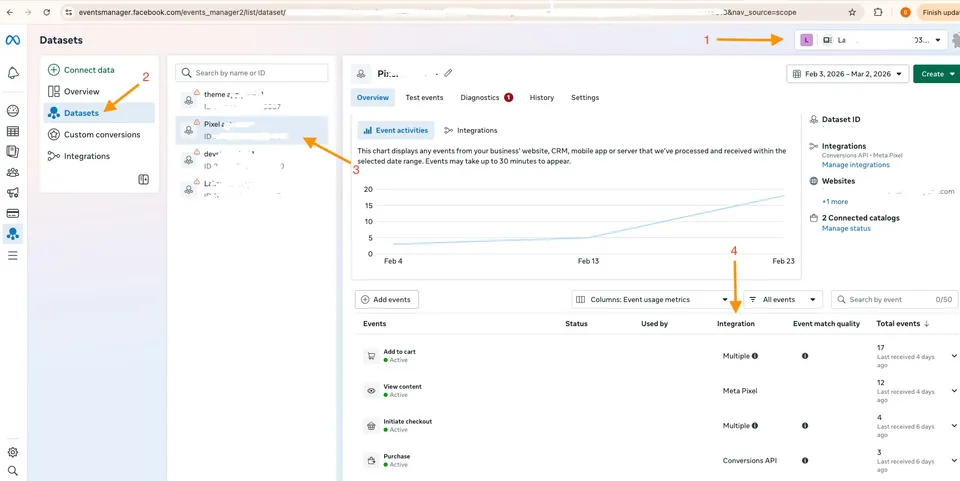
What matters: Look at the "Connection Method" column for each event type (Purchase, AddToCart, etc.):
Google Ads — Enhanced Conversions
Location: Google Ads → Goals → Summary → Select conversion action → Check the Status column
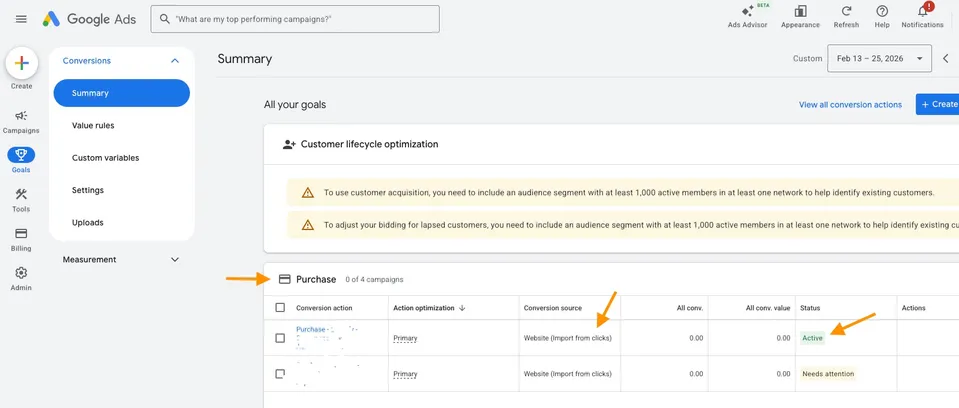
Verification steps:
Navigate to the conversion action settings and confirm Enhanced Conversions is enabled.
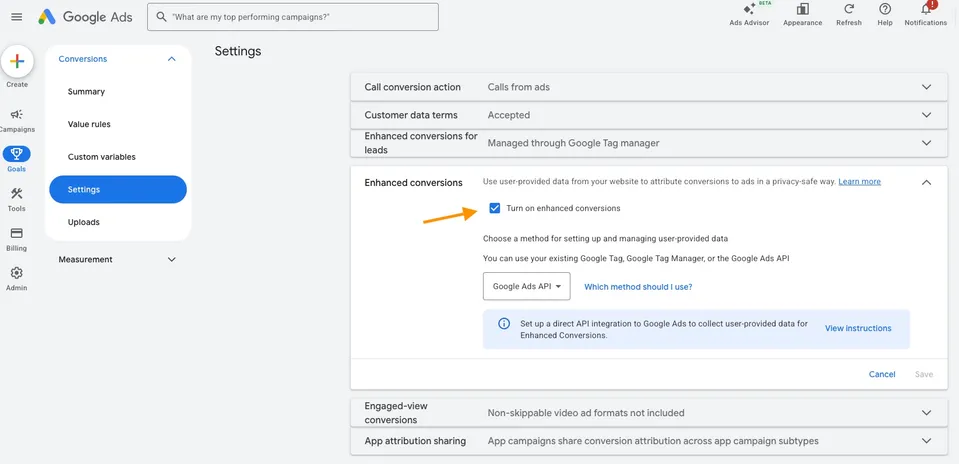
Google Analytics 4
Location: GA4 → Admin → Data Streams → Measurement Protocol API secrets
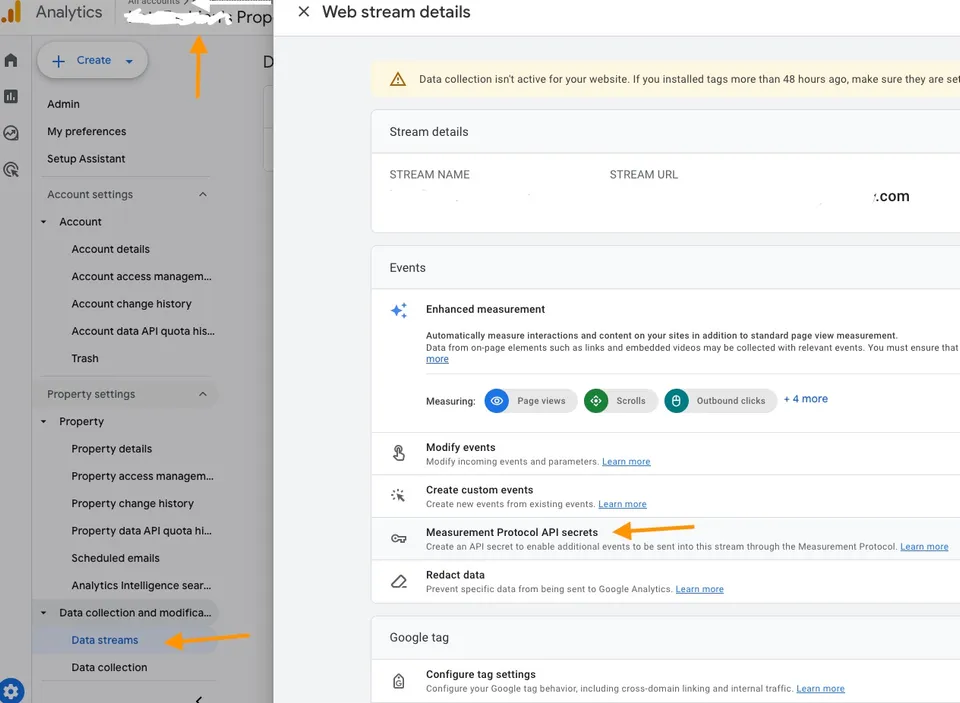
What to examine:
First, check whether any Measurement Protocol API secrets exist. Navigate to your data stream settings and look for the Measurement Protocol section. If no secrets are configured, no external system is sending server-side events to GA4 via this method.
Second, compare your GA4 purchase event count against actual orders.
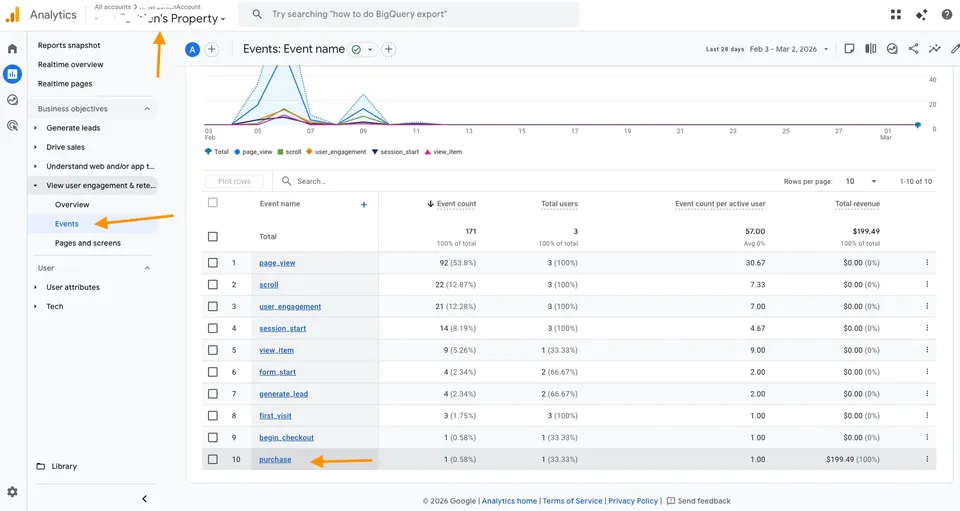
View Reports → Business objectives → User engagement overview → Events. If GA4 shows substantially fewer purchases than your actual records, conversions are being missed — suggesting server-side tracking is absent or misconfigured.
Note: Sites using server-side GTM may send events through a different path. Check your browser's network tab for requests to a first-party subdomain (like gtm.yoursite.com) as an indicator.
Pinterest — Conversions API
Location: Pinterest Ads → Conversions → Events overview
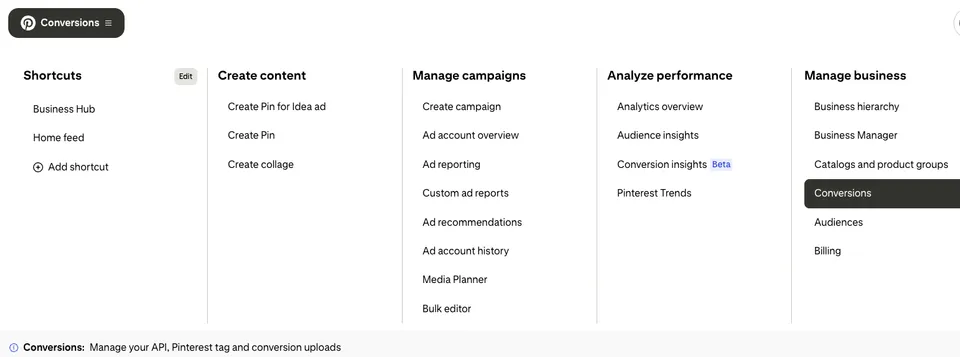
Switch to the Conversions API tab to see server-side events.
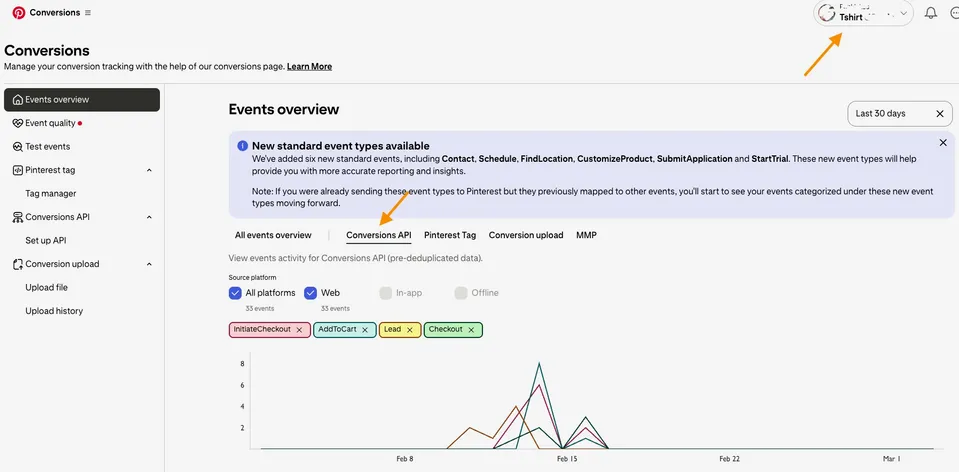
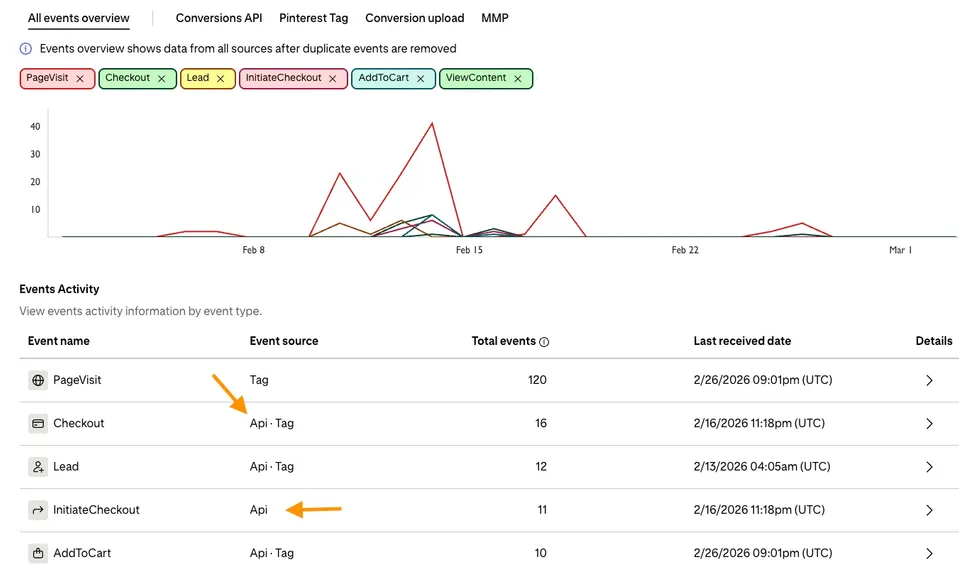
The Events overview shows the breakdown between "Tag" (browser) and "API" (server) events:
| What You See | Interpretation |
|---|---|
| API events present | Server-side tracking active |
| Both Tag and API | Server-side tracking active |
| Tag only | No server-side configuration |
A Simple Test Anyone Can Run
Prefer a quick verification without diving into platform dashboards? Here's a straightforward test:
The reasoning: Ad blockers prevent browser-based pixels from executing. If a conversion appears in Meta Events Manager, Google Ads, or Pinterest while the ad blocker was active, that data came from the server side — it bypassed the browser entirely.
This test provides a quick sanity check that something server-side is working.
Next Steps If Tracking Has Gaps
Discovering issues with your tracking — missing server-side events, poor Event Match Quality, or no CAPI configuration — is more common than you'd expect. Many website owners realize their setup isn't working months after they assumed it was complete.
The encouraging news: these problems are solvable.
Get a baseline assessment. Our free website tracking checker scans your current tracking configuration and pinpoints specific gaps. It takes under a minute and requires no installation.
Explore a purpose-built solution. JupiterTrack was designed to address exactly these challenges. It automates server-side tracking across Meta, Google, and Pinterest — handling Conversions API setup, Enhanced Conversions, and event deduplication without requiring deep technical knowledge.
Accurate conversion data forms the foundation of effective advertising. Every missed conversion is a signal your ad platforms can't use for optimization. Addressing server-side tracking gaps isn't just a technical improvement — it directly influences your advertising ROI.
Having read this far, you now understand server-side tracking verification better than most website operators. Put that knowledge to work ensuring your data pipeline is complete.